One person, one board, a team of AI agents: how I build and sell a SaaS alone
One person, one board, a team of AI agents
I build, market and sell a SaaS alone. With AI agents only.
Not as a stunt. It is how Business Studio and its go-to-market are made, every day. And Business Studio is the tool that makes it possible. This post is the setup, a real week, and the limits I would rather tell you myself.
Before
A year ago, every new feature cost a full day of work from each team (product, tech, marketing, communication) to prepare and plan it. Not to build it, not to check it: only to get it ready.
The work ran on a pile of SaaS tools, each used for about 5 % of what it could do: Figma; ClickUp, Linear, Jira or Trello; Notion; Slack; n8n; HubSpot or Pipedrive; PostHog or Segment; BambooHR; Brevo or Semrush; Mailchimp; Stripe; GCP or AWS; Hootsuite or Buffer; Canva; and a growing list of AI tools.
Keeping them in sync was close to impossible. Part of the truth lived in Google Drive, part in Slack, part in the code, and the edge cases in Google Sheets. Everyone had 30+ browser tabs open, each one pushing its own notifications.
The split that changed everything
AI apps like Claude and ChatGPT excel at one long, hard task: write the feature, draft the article, analyse the numbers.
They struggle with everything around it: remembering the plan from one session to the next, keeping track of tasks of every kind (admin, sales, marketing, communication), and managing what comes out of all those long runs.
A business also runs on hundreds of small tasks: file the new contact, sort the inbox, collect the supplier invoice, chase the unpaid one, schedule the post.
So I split the work:
- The AI app takes the long tasks.
- Business Studio organises everything around them (the plan, the files, the results) and runs the small tasks every day. It also holds what used to be a dozen tools: the CRM, the posts and the blog, the project and the roadmap.
- I arbitrate.
The setup
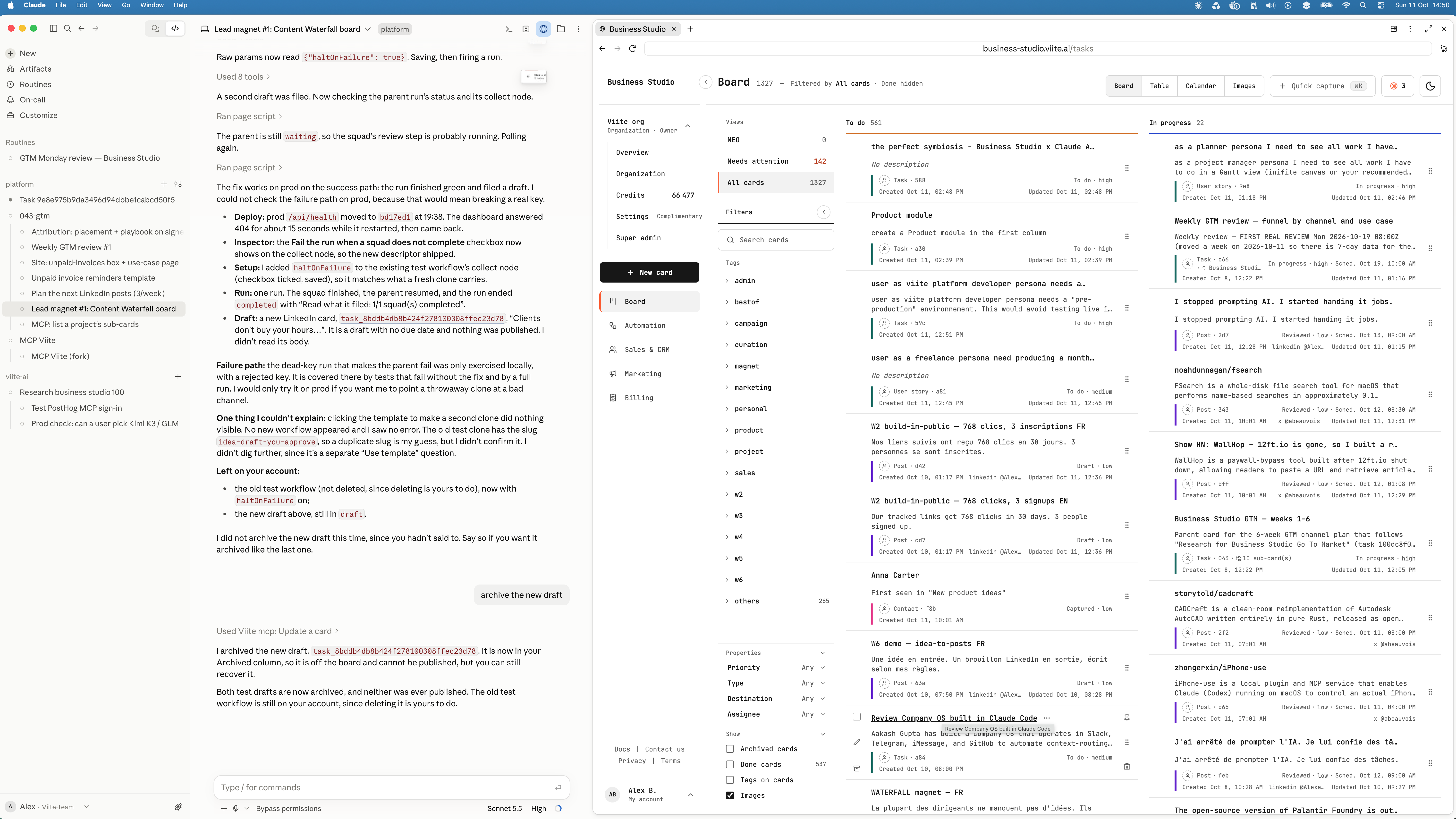
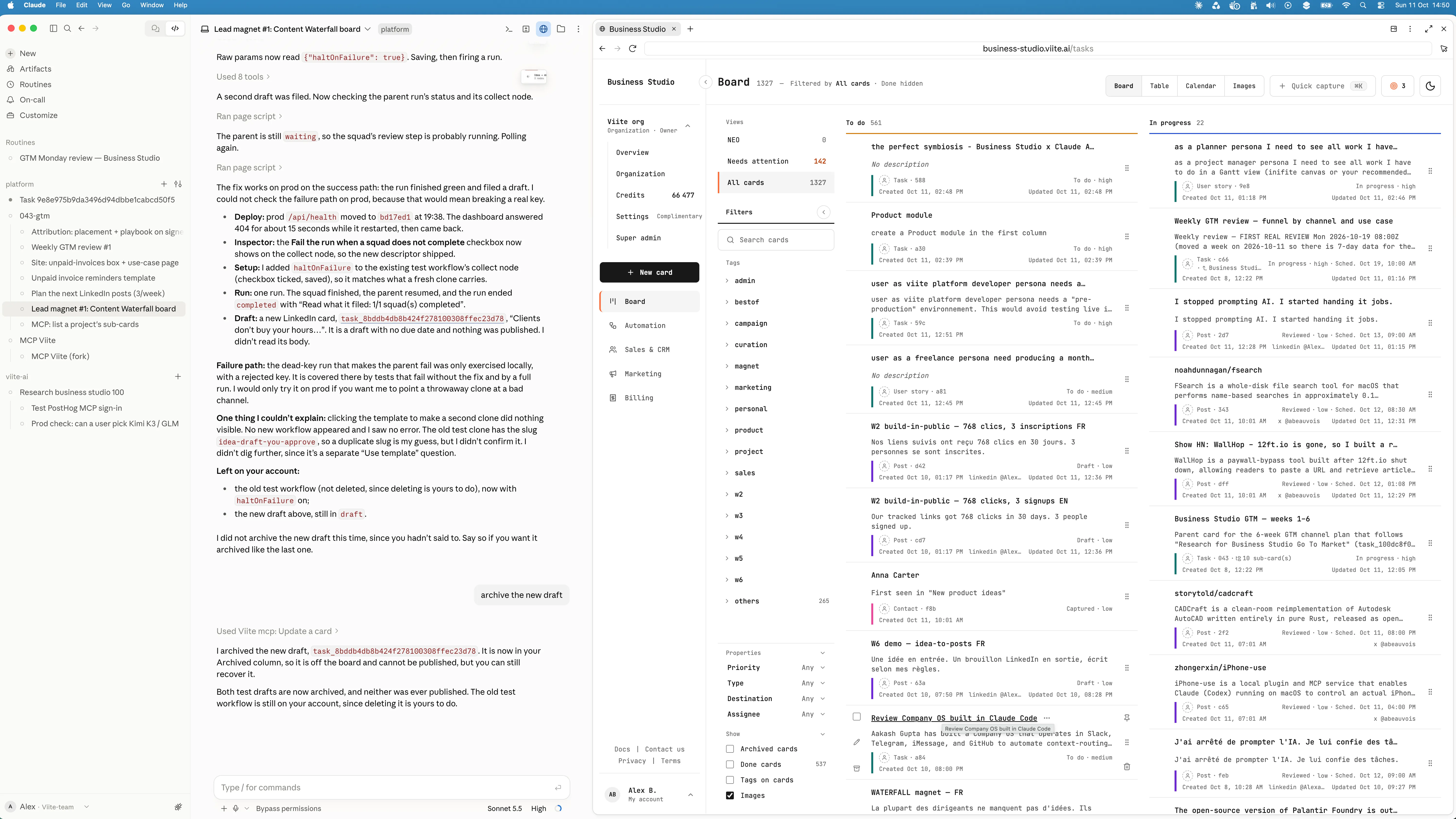
- Left: Claude. Each session is named after a card: "Lead magnet #1: Content Waterfall board", "Weekly GTM review #1", "Plan the next LinkedIn posts (3/week)", "MCP: list a project's sub-cards". The sidebar is my go-to-market to-do list.
- Right: Business Studio, open in Claude's own browser. The board with the same cards in To do and In progress, and a Gantt view of each project.
- In between: the connector. A session reads its card, does the work (code, copy, research, checks in production), writes the result back to the card (a draft, sub-cards, notes), and the card moves on.
- Me: the referee. I pick the next card, read the result, approve it, or correct the agent with one new rule.
Claude uses my board through the connector: it reads cards, their sub-cards and what blocks them, creates and updates cards, drafts posts, writes pages, looks up contacts, and tells me which channel brought signups. ChatGPT can do the same. And inside Business Studio, NEO (the built-in agent) works on a card with me: when it needs me, it asks, or it holds the change for my approval. Nothing goes public without my OK.
A real week (7–12 October)
| Day | What the agents did |
|---|---|
| Tue 7 | Go-to-market research and plan, a use-case registry, and a new homepage section with 12 use-case pages in French and English, live the same day |
| Wed 8 | Launch post published, the French version scheduled; the plan split into a parent card and its sub-cards; production checks |
| Thu 9 – Fri 10 | Onboarding playbooks and an activation metric shipped; the connector learned to read sub-cards; a lead magnet built; 16 post drafts in two languages |
| Sat 10 – Sun 11 | The first funnel review with real numbers; a Gantt view shipped; multi-model support verified in production and the copy corrected |
On Sunday, my board held 1,327 cards: 561 to do, 22 in progress, 537 done. 101 commits.
Why I brought back the Gantt chart
That volume is exactly the problem. When agents close dozens of cards a day, you lose track of what is done and what is left. A list stops telling a story at a thousand cards.
So Business Studio got an old engineering tool back: cards group under a parent card, each parent shows "X of N done", you mark what blocks what, and the Gantt draws it all. What is late shows in red. What comes next is obvious. The volume changed with AI. The need to see the whole project did not.
After
What took weeks now takes hours, and I do it alone. I use four times fewer SaaS tools: one workspace holds the features I actually used in each of them, and every one of those features was designed for AI from the start. NEO runs most of the daily tasks every company has to deal with, through automated workflows. The long, complex tasks go to frontier models in the Claude and ChatGPT apps. Everything comes back to the same workspace.
Honest limits
- The board does not launch Claude. I open a session per card, with a small command that reads the card. It is a practice anyone can copy: I put it in a free kit, not a button.
- Everything public waits for my approval. I approve fast, but I approve.
- The numbers are small and early. 768 visits and 3 signups in the last 30 days. Building in public means showing those too.
Where this goes
In a few years, millions of solo entrepreneurs who go all-in on AI will need what I am building. I know it because I use it every day to build it.
Your AI app does the deep work. The board keeps the plan, the files, the results and the hundreds of small tasks. You arbitrate.
See what the agents do, use case by use case · Connect Claude or ChatGPT to your board · The free Claude kit